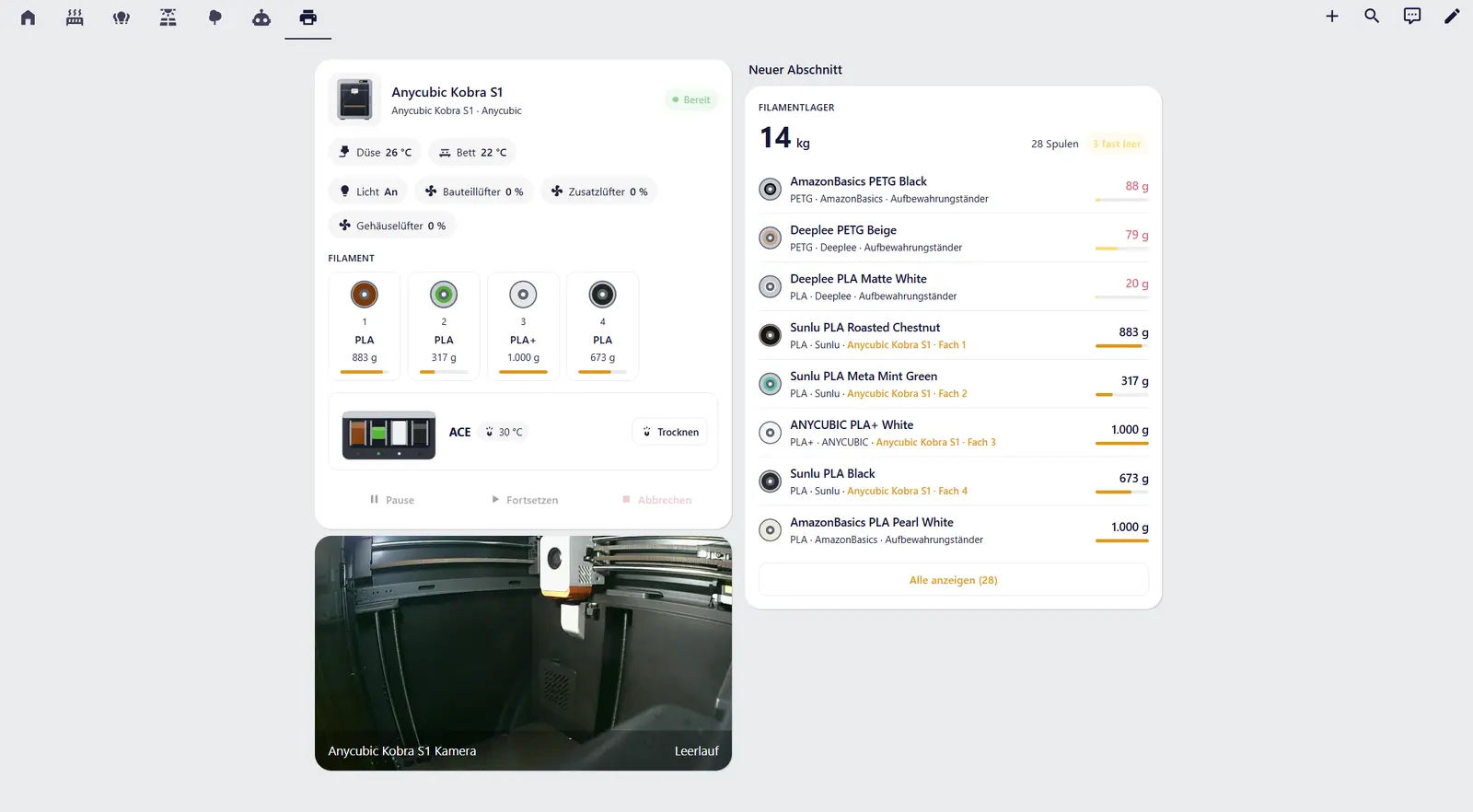
AllMyPrinters in Home Assistant

The AllMyPrinters agent now runs inside Home Assistant, and there is an AllMyPrinters integration that brings your printers into Home Assistant.
Agent as a Home Assistant app (Home Assistant OS or Supervised)
The guide is here: https://allmyprinters.com/en/agent/install/#ha
One button adds the repository, then you install and start the app. The agent shows up in the sidebar, so you don't need a separate Docker container.
Integration
Install it through HACS: add https://github.com/nolimitek/ha-allmyprinters as a custom repository, type Integration. If you use the app, Home Assistant finds the integration by itself. If you run the agent in Docker, update it to 0.6.2 first. Then add the integration with the agent's address and the key from Settings → Home Assistant in the agent.
What you get
- Every printer with status, progress, remaining time, temperatures and the slots with the spools in them
- All spools with what's left, plus filament boxes with temperature, humidity and drying
- Pause, resume and cancel for every printer brand the agent supports, plus light and fans where the printer allows it
- The camera and a picture of the model that's printing, ready for dashboards
Everything stays on your network. Questions and ideas are welcome here.