Everything allmyprinters can do
From the live view of your printers to your filament stock and slicing in the cloud – here is every feature in detail, with honest notes on where the limits are.
Free during the beta. Connected in a minute.
Every printer, live
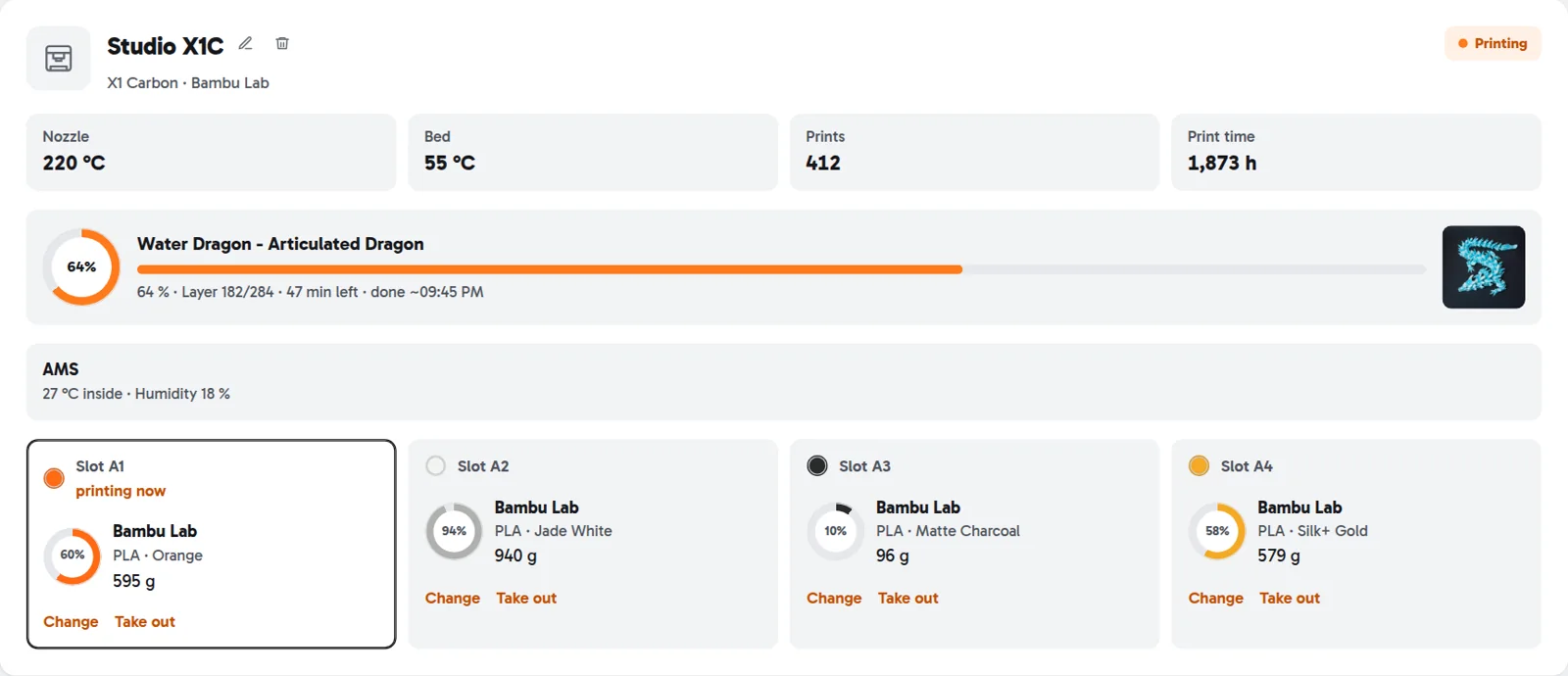
All your connected printers on one page – with status, temperatures and the current print. The view updates on its own.
- Progress, layer, time left and estimated finish, plus a preview image of the print
- Nozzle and bed, number of prints, print hours and total filament used
- Multi-colour units such as AMS, ACE Pro, CFS, CANVAS and MMU with every slot in its real colour – plus box temperature and humidity where the printer reports them
- Warnings right on the card: cancelled print with its error message, agent stopped reporting, maintenance due
- Pause, resume and cancel from your phone
Pause and cancel work with Anycubic, Klipper and OctoPrint printers and Prusa Connect. Bambu Lab, Creality and Elegoo show the status.
Spools in the slots
Assign each slot the spool that’s loaded – or take over every slot with one click.
- “Adopt spools” creates matching spools for all reported slots, with material and colour from the printer – for Bambu Lab also with the fill level from the RFID chip
- Matching spools from your stock are suggested first; swap or remove right at the slot
- Usage from a slot without a spool isn’t lost: it’s booked as soon as you assign a spool
- Klipper: set the active spool by macro, and spools from Spoolman are picked up and kept in sync
Deducted automatically
After every print, the filament used is taken off the spool in the right slot – without typing anything.
- Grams per slot, multi-colour prints included
- Cancelled prints with the amount actually used, where the printer reports it
- If a spool runs out mid-print, the rest goes to a matching backup spool in the same printer
- A printer connected twice (cloud and Klipper) is booked only once
- Your past print history is imported for the statistics, but never deducted
Elegoo printers are shown, but not deducted. Cancelled Bambu Lab prints aren’t booked, because Bambu only reports the planned amount.
Your whole filament stock
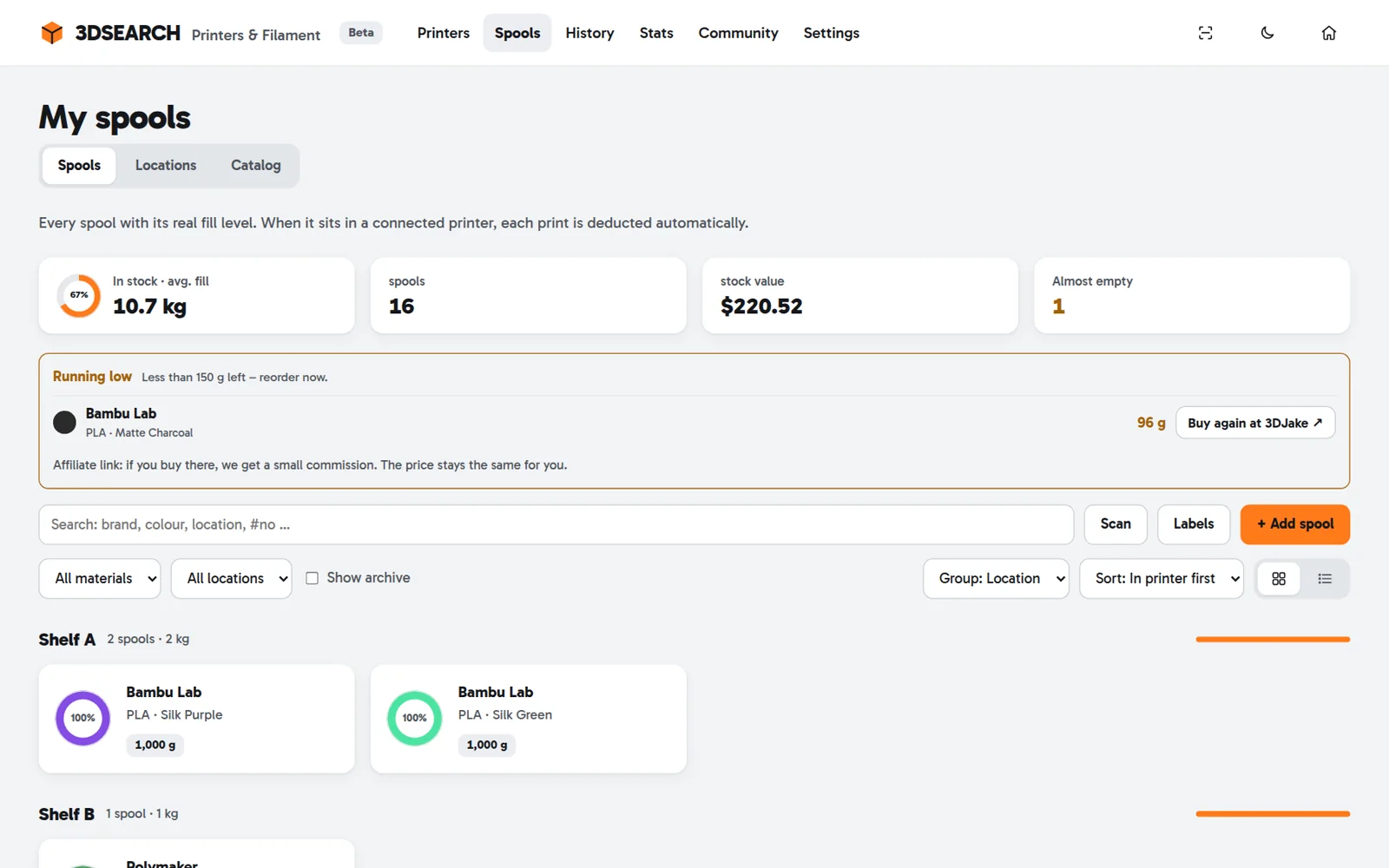
Every spool with its real fill level, value and storage place – as a grid or a list.
- A catalogue of more than 8,000 filaments from 67 brands, with empty-spool weight, density and temperatures
- Add spools in seconds: full, with remaining weight or weighed (gross minus empty spool) – several identical ones at once
- Group by storage place, filament, brand or material; filter, search, sort
- Storage places like shelves, dry boxes and drawers – move spools by dragging or tapping
- Per spool: remaining length in metres, history, batch, re-weigh, archive and custom fields
Drying under control
The tool remembers when a spool was opened and dried, and reminds you in time.
- Advice per material: PVA and BVOH after 3 days, nylon after 7, TPU and PC after 14, PETG after 30
- A warning when the humidity in the box stays too high for too long
- Start and stop ACE Pro drying right from the tool, 35–55 °C, with presets
One-click drying works with the Anycubic ACE Pro (cloud or Rinkhals). AMS, CFS and CANVAS can’t be controlled remotely.
Labels and QR scanner
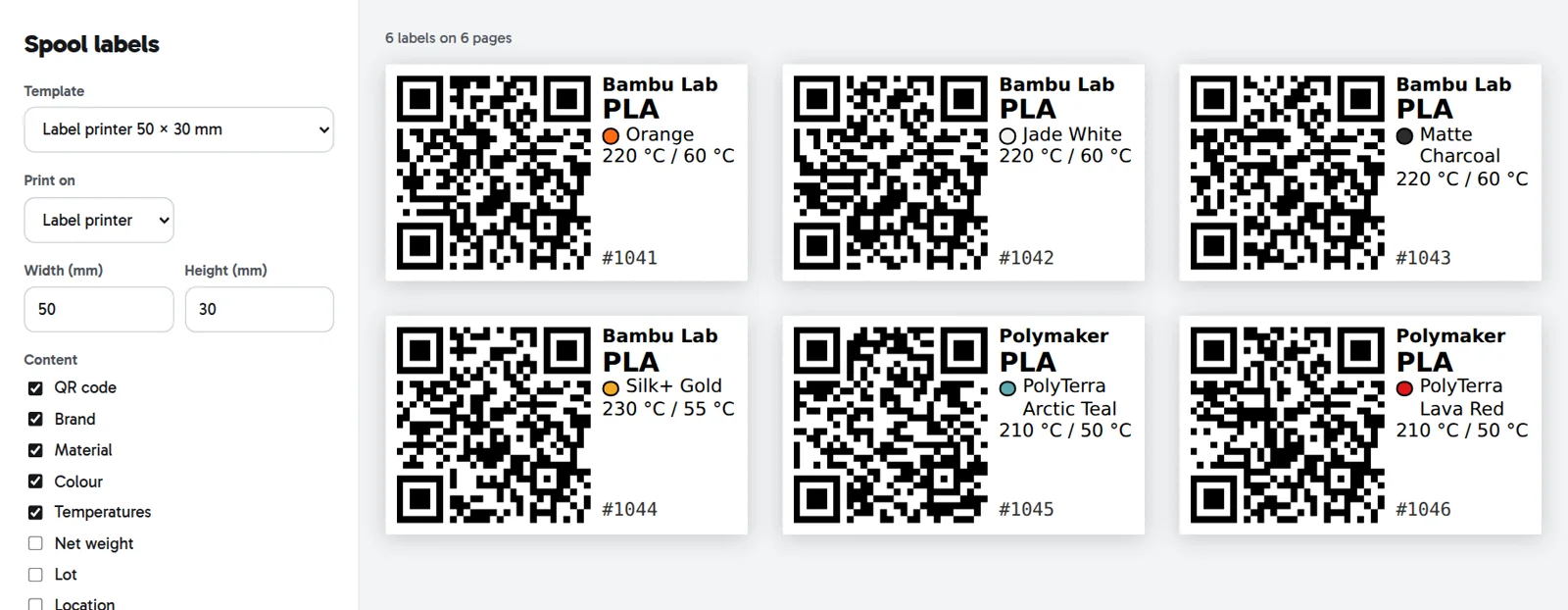
Print a label with a QR code for every spool. Scan it with your phone and exactly that spool opens.
- For label printers or A4 and Letter sheets – with templates for Avery Zweckform 3475 and 3657 and Avery L7160 and 5160
- Custom sizes and margins; reuse partly used sheets
- Choose what’s on it: brand, material, colour, temperatures, weight, batch, storage place, spool number, custom fields
- The built-in scanner also reads Spoolman and SpoolDB labels
Move in without retyping
Bring your stock with you – from almost any tool you’ve used so far.
- Import from Spoolman, SpoolDB, OctoPrint FilamentManager and SpoolManager, or any CSV file
- Preview before saving; importing again updates instead of duplicating
- Export as CSV or CSV for Excel, with your custom fields
Every print with its cost
All print jobs by month – with duration, grams per slot and what the print cost.
- Cost per print from filament price, power (your printer’s watts times the electricity price) and wear per print hour
- Success rate, usage and cost per month at a glance
- Filter by finished, cancelled and running; search by print or printer
- History of every booking: print, queue, manual, re-weighed, dried
- Shown in 27 currencies
You enter the power per printer; it isn’t measured.
Your printing in numbers
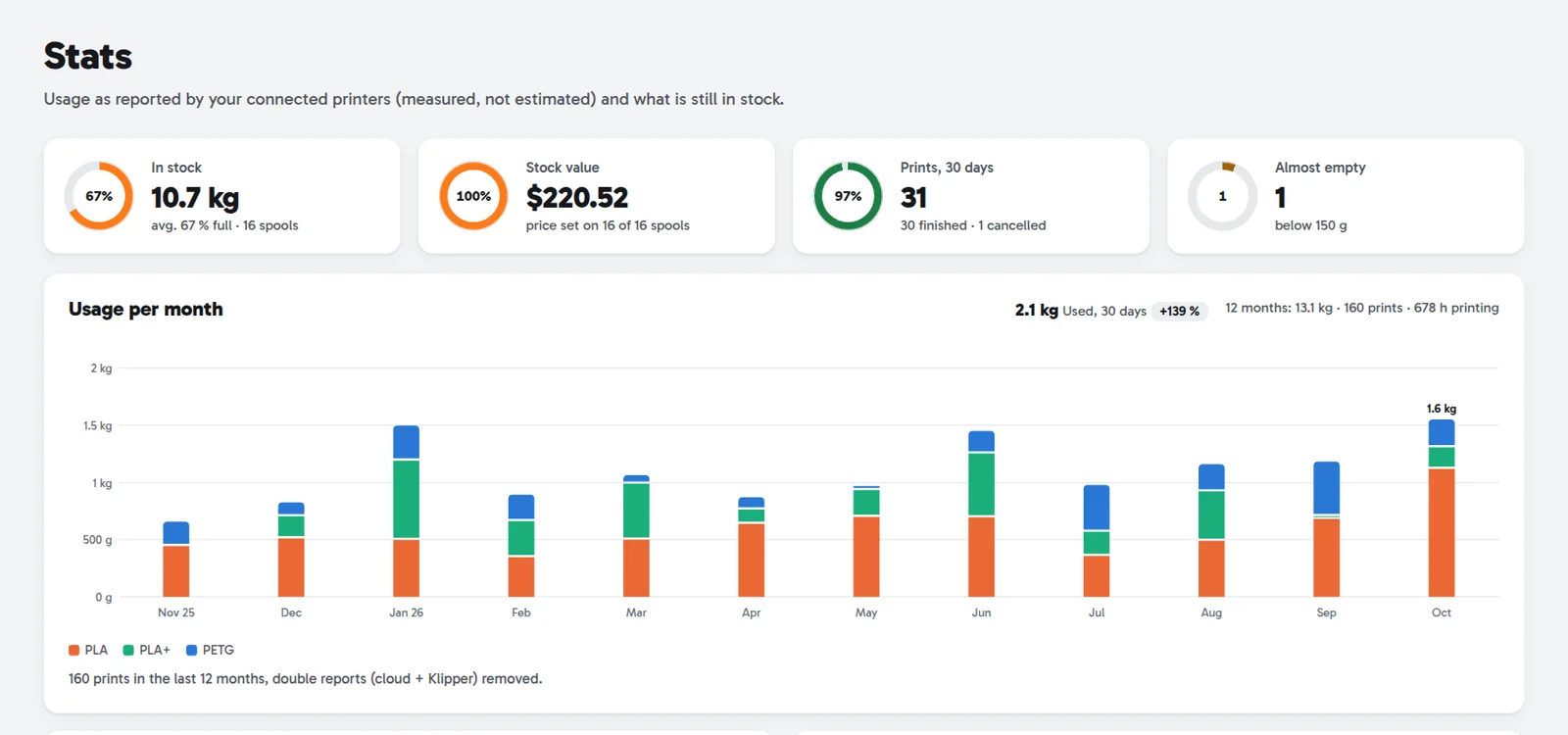
Usage, stock and printers over twelve months – from real printer data.
- Usage per month by material, compared with the 30 days before
- Stock by material, colours printed, most-used spools
- Per printer: prints, hours, kilograms and success rate
- Records like heaviest and longest print
- How long each material lasts – with the day it’s likely to run out
Compare with the community
Anonymous numbers from all users – and where you stand.
- Most popular materials, colours and filaments, success rate per material
- Print hours, kilometres of filament and share of multi-colour prints
- Average price per kilogram
- You compared: your usage, your success rate, your main material
A group only appears once at least three users contribute to it.
Maintenance by real print hours
Create maintenance tasks per printer – due after print hours, kilograms, number of prints or days, counted from your real prints.
- 8 ready-made templates, e.g. clean the bed every 30 days, check the nozzle every 300 hours, belts every 300 hours
- “Due soon” and “due” right on the printer card, with an email or push alert
- Mark done with a note – the counters restart, the history stays
Print queue with projects
Plan what to print next – as a board with the columns Queue, Slicing, Printing and Done.
- Add models from the 3DSEARCH search with one click
- Drag cards between columns and group them in projects
- When a print finishes, the tool suggests ticking off the matching card
Free up to 3 active cards, unlimited with a Supporter subscription.
Slice and send to your printer
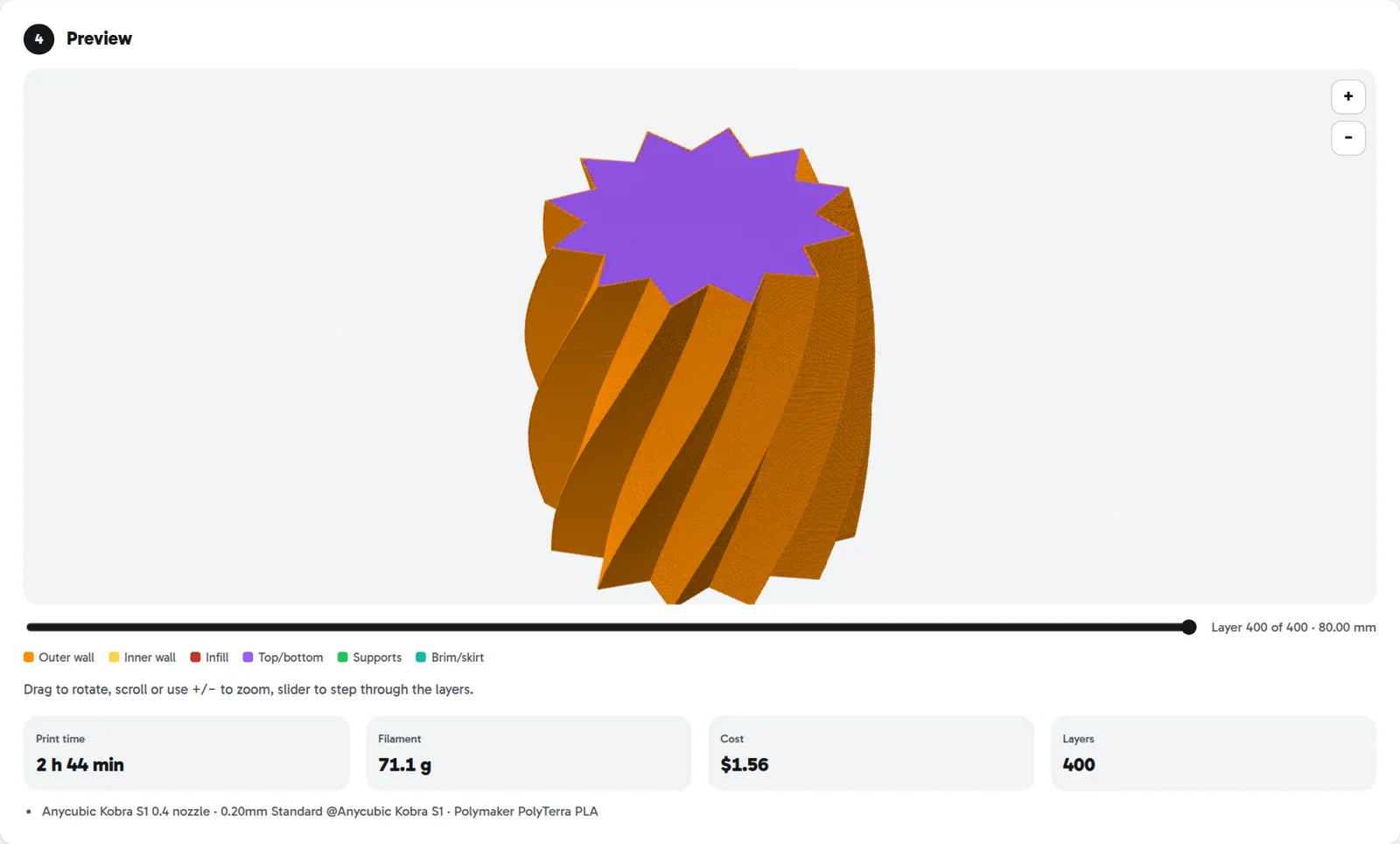
Upload a model and the server slices it with OrcaSlicer and your printer’s official profile. You see exactly what will happen first.
- STL, 3MF or ready-made G-code up to 80 MB
- 3MF files keep the designer’s settings; choose the plate, skip parts, arrange automatically
- Checks before printing: too big for the bed, filaments with different temperatures, not enough filament on the spool
- 3D preview with a layer slider, print time, grams and cost
- Multi-colour: a suggestion for which colour goes in which slot
- Send, upload only or add to the queue – print saved files again later without re-slicing
Printing works with Anycubic and Creality (cloud), Klipper and OctoPrint printers and Prusa via the bridge. Bambu Lab doesn’t let other apps start prints. Slicing is for a 0.4 mm nozzle. Saved print files: 2 free, 30 with a Supporter subscription. Beta.
Notifications
The tool lets you know when something needs doing – by email, push or Discord.
- Spool in the printer almost empty (threshold adjustable), with a link to buy more
- Box too humid, print cancelled or failed, print finished
- Maintenance due, printer offline for 7 days, connection lost
- Every alert comes only once
Home Assistant and app
Bring your printers and spools into Home Assistant – or take the tool with you as an app.
- Home Assistant integration via HACS: status, progress, temperatures, slots with spool weight and colour, maintenance, stock and monthly cost
- “3DSearch” sidebar: the whole workshop with printers, spools, slicer and queue right inside Home Assistant – in your theme’s look
- A “print finished or failed” event for your own automations
- Pause, resume, cancel and ACE drying from Home Assistant – for Anycubic and Klipper printers
- Android app on Google Play; on iPhone in the browser, with push as a web app
- In 6 languages, light and dark
You add the integration in HACS as a custom repository. Home Assistant administrators see the sidebar.
What does it cost?
Everything is free during the beta – with no limit on printers or spools. Only two things are limited: 3 active cards in the print queue and 2 saved print files. A Supporter subscription (€3 a month) removes these limits and supports development.